FM COMPUTER TRAINING INSTITUTE

COMPUTER TRAINING IN URDU/HINDI WITH ENGLISH SUBTITLES, REGISTERED SOFTWARES,GAMES, COMPUTER SCIENCE DATA IN Hindi/URDU, DATA RECOVERY REGISTERED and MANY MORE

Showing posts with label SEO. Show all posts

Thursday, May 21, 2015

What is Anchor Text and Why is it Important for SEO?

What is Anchor Text and Why is it Important for SEO?

SEO has changed significantly in 2015, and with algorithm changes like the Penguin update, the entire game of back-linking has changed. One of the most important aspects of a backlink is anchor text. In this article, I will explain everything you need to know about anchor text SEO.
What is anchor text?
Anchor text is the text that appears highlighted in a hypertext link that can be clicked to open a target web page.
For example, see the image below:
Anchor Text
If you are a regular visitor to MY FM COMPUTER, you know that I very frequently link back to my older posts using anchor text.

How anchor text helps with SEO:

There are many direct and indirect SEO-related advantages of using anchor text, and I will point out some of the most important ones in this article.
It has been well established that keyword research and on-page optimizationare important to every blog post. Every blog post you write should contain one or two good keywords.
In addition, linking to other articles and information using anchor text is also a very good practice for bloggers to regularly incorporate into their work.
One mistake which many bloggers make, however, is in simply linking back to old articles with text like “read here” or “more information here”, which does not give much technical value to search engines. A more useful way to link back to your articles withanchor text is by creating links that use your target keywords!
This is not only important for internal links, but when you are working on your guest posting campaign, you have to make sure that you are getting links from other domains with anchor links. I would add that with the recent Penguin update which is associated with SEO over-optimization, I suggest that you take care to maintain a good ratio of money-related and non-money-related text.
For example, if my blog is using the keywords “Make money Online” and my brand name is “myfmcomputer”, technically most SEO’s will suggest using links containing the keywords “make money online”.
However, a better approach would be to use a mix of keywords. For example, I might use keywords like “make money online”, “make money from blog”, “myfmcomputer”, “Shout Me Loud” or “Harsh Agrawal” to get links to my homepage.
Additionally, I will need to make sure the links are of high quality, and that 50% of the links I’m getting will include my target keywords.
By doing this we are keeping a good mix related to our brand, and our backlinks will be more fruitful, and free from any Google algo updates in the future.
In WordPress it is very easy to use anchor links. When you add a link to any text, you get an option to add a title, and that serves as your anchor text. See the screenshot below:

Direct and indirect benefits of linking with anchor text:

Readers:
Let me start with the direct benefits of anchor text from the readers’ perspective.  First, of course, they will be given more related links on interest to visit, (and your bounce rate will go down).  Anchor text also helps to improve the average time a reader spends on the site (as well as your blog’s page views).
An important note: When you are linking back to your article, make sure you link to related topics only. Irrelevant linking will be irritating for readers.
SEO benefits:
I have previously explained how backlinks with anchor text help to increase the general understanding of the page.  Recently, with my SEO campaign, I have seen a significant improvement in the search engine positioning of one post, with one backlink.
Just keep a good proportion of 50-20-20-10 of your target anchor keywords. Also, when you are getting a link back, target internal pages too, instead of only your homepage.
If you are using WordPress, I suggest that you try the following two plugins for faster and better linking:
By optimizing our anchor titles we are not only assisting our readers, but we are also helping search engine bots to better understand the content of our site.
How about you? Do you take care of anchor text when you link to your old articles or any other articles outside your domain?
If you find the information in this post useful, please share it with your friends and colleagues on Facebook, Twitter and Google Plus.
0

keywords “Make money Online”

Why You Can’t Rank For Keyword Make Money Online


Every time I surf internet, I come across thousands, not even thousands maybe millions of blogs targeting the keyword “make money online”. And why not ? It’s such a profitable keyword, its a gold mine basically. There has got to be every possible reason that you are targeting this gold nugget keyword “make money online”. Be it Adsense, Affiliates, CPAs, ebooks, clickbank products and what not – you just name it and have it !
Sounds easy eh? Well maybe not, do you even have an idea how many blogs and sites are targeting this keyword. Well I guess no otherwise I won’t see every other day a new blog just targeting this keyword. Well its funny isn’t it ? A newbie blogger who hasn’t made a cent online and is completely new to internet marketing and blogging starts out with the niche “make money online”. A man who is yet to make a single dime preaching like a guru and rewriting crappy blog posts dreaming after a month or two I will start earning a decent amount of bucks. Well if you are one of those noobs, then you really need to get a life.
Sorry for being rude but before you jump in something make sure you get your facts right. I am not a guru by any means, infact I am just 4 months old as far as my blogging background is concerned, but I am glad i didn’t start a make money online blog. That’s another thing i managed to avoid this by accident :-P I started with an educational blog by accident as I didn’t know about monetization, niches and stuff at that time. Although the CPC sucks big time courtesy Indian traffic but considering the low competition and number of searches it evens out :-P Anyways I am just sharing my experience which might be useful to some guys who are yet to embark their blogging journey.
Ok enough of my blunt tone. Now let’s get real and analyse why the so called profitablekeyword “make money online” is so damn difficult to rank. Lets see a step by step approach. This also might be helpful to you to know a thing or two about keyword research.
We will proceed how every blogger however successful or new starts:

STEP 1 – How profitable is the keyword “Make Money Online” ?

First of all we head to google adwords/keyword tool to see the cpc of the keyword. CPC only doesn’t mean for adsense. A high CPC word basically means that the advertisers are willing to spend money just because it will give them profits. So a high CPC also means this keyword has good opportunities as far as affliates and CPA offers are concerned.
So what we do after opening the google adwords tool is enter the keyword “make money online” (without quotes). Secondly we ensure that we have All countries option selected. Unless you are targeting a specific area there is no reason you shouldn’t select All countries ;-)
Important – You have got to avoid this blunder mistake. See the screenshot below. By default Broad searches is checked in adwords tool, but if you really want to know the actual potential of the keyword as in number of searches per month, you must check Exact.
typing the keyword make money online in google adwords tool

STEP 2 – How many search counts does “make money online” get and what is its CPC?

As you can clearly see below “make money online” receives a freaking 135,000 searches per month. The CPC of this keyword is around Rs 105 (above 2$). I believe any keyword which has a CPC of above 1.5 dollars in Google adwords tool with a minimum searches of 3000-4000 is a good word to target given the fact that u can rank :lol:
checking cpc and search counts in adwords tool
Ok hold it right there. Most of the people stop after step 2, they just don’t care to see the competition and I don’t blame them. Even when I started blogging I didn’t care about the niche, the Keyword competition but gradually I encountered the harsh truth of blogging. Ok moving on further.
STEP 3 – Real competition for target Keyword:
So in this step what we do is head to the BIG G and type the keyword which we are targetting.
entering keyword in google and checking no. of results
Now when we enter “make money online” in google.com we are presented with about 518 million results :? But no that doesn’t mean you are competing with 518 million sites. We already know how important is having the keyword in title and keyword in url. This forms the basis of on-page SEO which I believe you already know.
So now we check how many sites are having the keyword “make money online” in title. so we enter a search query in google i.e.
intitle:”make money online”
checking competition for the keyword using intitle
We see that out of 518 million sites, around 17 million sites have the keyword in title.
Now we will check how many sites are having the keyword “make money online” in their URL. So we enter a search query in google i.e.
inurl:”make money online”
checking competition for keyword in google using inurl
We see that out of 518 million sites, around 28 million sites have this keyword in their url structure. Now the important thing to note is that the keyword in root domain has more value. As the hierarchy goes deeper the value of keyword in url diminishes. So value of keyword in www.keyword.com is more than www.yoursite.com/keyword/ .
Now the site which has both the keyword in title as well as url will obviously have better chance of ranking. So we enter a query in google
intitle:”make money online” inurl:”make money online”
seeing search results which have both keyword in title and url
We see that your real competition has narrowed down from 518 million to around 8 million sites. Thats your real competition :-)
But lol 8 million site is still too much to compete. There is a very little or no chance that you will be able to outrank these sites as some of them are even 5 year old and 10 year old with millions and zillions of backlinks.
Ok so now since you are competing with 8 million sites but since your aim is to rank top 10 in google so if you manage to outrank these top 10 websites you will automatically beat those remaining 8 million sites. So now we will have a closer look and analyse the top 10 results. How many backlinks they have, whats the site’s age ? What’s its PR ?

STEP 4 — Using Traffic Travis to analyse the top 10 results

Well first of all, let me tell you that Traffic Travis is a tool which makes your life easier as it helps in checking the competition, analysing the seo competition and tons of other features including keyword research. You can also use Market Samurai but since Traffic Travis is free I am using that.
So we open Traffic Travis and click on analyse keyword button
using traffic travis
Now enter the keyword in the given column, select country as USA as basically we want to rank on .com and press analyse.
using trafic travis to check competition
Traffic Travis will take a minute or two and present you with the top 20 results and give you an insight of various ranking parameters of the sites like PR*, age (looks like a bug possibly in the below screenshot since its showing 0 for all), h1 tags, title, description, whether the site is listed in DMOz or not, and most importantly, number of backlinks pointing to that page which appears in the SERPS as well backlinks pointing to the whole domain.
*NOTE – By PR we mean PR of the search result i.e. Page and not the PR of the domain.
A careful observation at the above results present the true story. How many search results you see above have a PR 0 among top 10 ? Hardly do you seeany PR 0 site except 1. Each page listed above is having thousands of backlinks for that page alone forget the whole domain :roll: So by the time you build these many backlinks and wait for the google spider to index them, it will probably take years.

STEP 5 – Using Chrome Extensions (Seoquake) and Firefox Add ons to analyse top 10 Results

Well instead of using Traffic Travis you can also use Seoquake Chrome Extension which will present you with the stats just below the search result in google. (See screenshot)
using chrome extensions and firefox add ons to check competition
Alternatively you can also use SEO For Firefox Mozilla add-on by seobook. It will also serve the similar purpose ;-) Additionally it also gives the .edu and .gov links for the search results :-)

CONCLUSION – How to choose a good keyword then

Ok I told you why “make money online” keyword is a bad choice. So what are the characteristic of good keyword ? Here they are –
  • a CPC of minimum 1 dollar
  • Atleast 4000-5000 “exact” searches monthly consistently (You can use Google Insights and Google Trends to see the search patterns for past few months)
  • Around 4-5 results PR 0 results in top 10 (Again I stress PR of result not domain)
  • Not more than 2 or 3 sites having more than 200-300 backlinks for that particular page (yahoo inlinks for page not link domain)
I don’t look at the number of sites having title and url because ultimately if I manage to outrank top 10 sites then I can say I have achieved my mission.
I guess that’s enough considering my first guest post :-P. If you find a keyword following above conditions, then i guess more than half your job is done. So go ahead find your keyword, stack up some articles, make backlinks, wait to achieve top 10 ranking and milk money ;-) Happy blogging !
0

On Page SEO Techniques To Rank On First Page – 2015 Edition

On Page SEO Techniques To Rank On First Page – 2015 Edition


Want to make your post Keyword targeted? ..
Want to make it easier for search engine to understand what Keyword your blog should rank for?
If yes, you are about to learn the secret of making your blog post Keyword targeted.
When it comes to optimizing a website or blog posts, there are two factors that plays a big role. These two factors are Onpage optimization and Offpage optimization. Today’s article, remain focused around On page optimization and I will be sharing some good on page SEO techniques you should implement while working on onpage aspects of your blog posts.
On Page SEO Techniques
Now, lets not confuse onpage SEO optimization with Onsite SEO optimization. Talking about, onpage SEO, we optimise our content for our target  keyword. This includes use of proper heading, keyword placement, content quality and many other factors. We will look into them one by one in this detailed post.

Why do you need OnPage Optimization:

So what’s the target of this post: This post will help you to write more search engine optimized article. Now, when I say SEO optimized article, many blogger think it’s a bad practice.
But, again here is a takeaway from Harsh last post on Recover from Google panda:
Search engine is nothing but a set of algorithms, it look into various factor to rank your page for certain Keyword. Now, here we will help search engine to pick the target Keyword from the post and make it more target able.
Here is a food of thought: When you publish a post, have you ever thought why you have not got 1st page ranking. ?
So when we do SEO optimization of post, it means we follow certain set of proven method to rank higher in search engine. Now ranking in Google, doesn’t only consider On page SEO score, but it also take care of many factors like Social media votes, back links,domain authority and many other offpage factor. Our goal here is to optimise our article in natural but smart way, so that search engine can easily pick the target keyword (Focus keyword) and thus, instead of raking for irrelevant long tail keyword, we will get more targeted visitors. Here is an interesting article which shows how on page optimization isnot dead.
Before, you read more, I assume you know about Keyword research and you have found a Keyword for next post, which is going to be a perfect example of onpage SEO optimized post. Here are latest 2015 On-page search engine factors :
On page SEO Ranking factors

As you can see from the above list, a lot has changed in 2015 and most important factors are relevant keywords, internal links. Above chart is prepared by search metrics team after analysing top pages from Google search. One thing which I highly recommend you to do from now on is to take advantage of adding videos in your blog post. Adding videos will not only increase the rich media on your post, it will also make users stay more on your blog post.

10 Onpage Optimization Techniques for Better ranking

So here is the ultimate list of 10 Onpage Optimization factors you should keep in mind while optimizing your blog posts:
Blog Post Title
Most important Onpage factor which really plays a big role in deciding whether our blog posts will be doing well on search engines front is its title. We should make sure we are using targeted keywords or phrase towards the beginning of Title tag. We should not repeat the same keyword in title tag with the intension to get better rankings on Google, Yahoo and Bing. And we should keep limit Title Characters length to 65 Characters only with spaces.
Post Permalink Structure
Then it’s about going ahead with a search engine optimized URL structure. Again, you should aim at using targeted keywords towards the beginning of blog post URL. You should avoid using special characters, symbols, brackets, comma’s etc as part of your post URL. Most of the times you should be using alphabets and numeric from 0-9 in your URL structure and use dashes to differentiate two strings in URL structure. Make sure to follow a pretty permalink instead of random strings in your permalink.
Heading Tags
You should use heading tags like h2, h3 and h4 etc to highlight various headings, sub-headings and important points. Our Title tag is used as h1 tag at single post level in WordPress. So we don’t need to use any h1 tag in our blog post body section. Also, don’t repeat H2 or H3 tags too many times, as it is considered as negative SEO practice. Here is what Matt Cutts has to say about repetition of H1 or any other heading tags.
Keyword Density
You should keep the keyword density to up to 1.5% percent with mix of LSI keywords. You should be using your main keyword once in first paragraph and then in the last paragraph apart from regular use in blog post content. You should use bold, italic and underline to highlight important keywords and phrases in your blog post. Here is official Matt Cutts comment on what’s the idle Keyword density:
Meta Tags
You should add unique and relevant meta keyword and meta description with each of your blog post. Again, you should use your use targeted keyword in the meta description and meta keyword section. You should create a meta description tag which work as a summary for your blog post. You should limit meta description length to 160 characters including spaces. You should write user friendly meta description tags forbetter Click Through Rate (CTR) in search engines. Though, many search engine like Bing still prefer meta keywords but Google already made it clear that they don’t give any weight-age to Meta keywords. Here is official statement from Google regarding use of Meta Keywords:
Addition of Images
We have already talked about Image optimization for SEO and it helps a lot in driving traffic from image search. Though, according to many case studies, Keyword in alt text in image and image title helps a lot to make your blog post more focus and targeted. Now add one or multiple images to your blog post. You should include targeted keyword as part of image name, image alt text etc. Availability of images makes our blog contents more interesting and attractive. While adding images, you should look out for small size images only. Addition of big size images will slow down your blog speed and will ultimately lower down your blog rankings as these days Google Started consideringwebsite speedas one of rankings factor on Google organic search.
Word Count Per Post
I don’t see blog posts doing well especially on search engine front page having very few words. So as standard, you should try to draft blog posts carrying minimum 700 words. If possible write long and well researched blog posts while targeting highly competitive keywords in your niche. More over, if you writing naturally and covering everything related to the topic, your topic would be of great length. Suggestion: Analyze other posts on the target keyword and see what you are missing and if your post is better than post ranking on first page in Google or not. Though, there is no limit or exact number for minimum word count for SEO optimized posts, but ideally I keep it more than 700 words. This post is over 1900 words plus.
Content Interlinking
You should link out to related blog posts from your blog to send additional page rank and traffic to them. Interlinking of blog posts naturally will help your blog readers spend more time on your blog. But you should not overdo it. While linking out to your own blog pages, you should use keyword rich anchor text as that will help the linking posts perform better on Google and other search engines for their targeted anchor texts. Also, keep variation while internal linking but don’t confuse Google with two similar post for same target Keyword.
Linking out to External Websites
Apart from linking to your own blog posts, it is a great idea to link out to external websites if you feel addition of links for them will help your blog readers find more and relevant information about the topic you are currently blogging about. While linking out to external websites, you should link to trusted websites only. And if you have doubts about the authority or popularity of a website, you can use nofollow tag to avoid passing page rank and search engine rankings to bad neighbors.
You should use dofollow link for trusted websites and nofollow link for those about whom you are doubtful about their trust rank on Google. If not, try to link with Wiki article, which is considered as one of the most authoritative source of information. Even if not from onpage optimization point of view, linking to useful resource helps readers and make your content more credible and informative.
Write Engaging Content
You should write engaging content in your post and should work as a complete manual for the targeted keywords for that post. You should look at various ways so that people get engaged with your blog contents. You can do this by asking some kind of questions or asking for their opinion on topics related to your blog and etc. If you are unable to write engaging contents on your blog, people will not spend much time on your blog and will immediately leave your blog. This will result in higher bounce rate for your blog and which will work as a negative factor when Google calculates your blog rankings for targeted terms.
On page SEO Checklist:
Here is the final checklist which you need to follow in 2015 to make sure your content rank higher in search engine.
Keyword placement:
  • Keyword in Title
  • Keyword in Permalink
  • Keyword in first paragraph
  • Keyword in Image Alt tag
  • Tweaked Keyword in H2 or H3
  • Bold Important Keywords and related keywords
  • Italics 1-2 important Keywords
  • Outbound Link to relevant high-quality sites
  • Internal links to related articles
  • Remove all stop words from Permalink
  • Add multi-media (Video, Slides, Inforgraphic)
  • Longer the content length, better it is. Minimum: 700 words
  • Optimize image before uploading (Compress and resize)
  • Page loading time
  • Use LSI Keywords (Use Google search to find related Keywords)
Other things:
  • Use Meta title in less than 65 character
  • Use Meta description in less than 150 characters.
  • If using any Social SEO plugin, make sure to add image for Facebook, Twitter. (Take advantage of social graph)
  • Make sure to have social sharing buttons at the end of post or floating social sharing buttons.
  • Have related posts after blog posts to lower down bounce rate.
Things not to do:
  • Not more than 1 H1 tag (Your Post title is H1 tag)
  • Don’t repeat H2 and H3 Tag
  • Don’t increase Keyword density by more than 1.25%
Things to focus on:
  • Try to use Keyword in Post Title at beginning
  • Use Long tail keywords (You can use up to 65 Character in Post title)
  • If writing in evergreen niche, remove dates from the posts. (Use Date Exclusion SEO plugin)
  • Content length: The longer the length of the content, better it is. Though don’t try to uselessly increase the content size.
  • At the end of blog post, ask users to take action.
With this, you have covered all the factors that you need to have to make your articles on page SEO full-proof. If you have any queries or want to add your tip, let me know via comments.
0

keyword research using google keyword tool

How To Use Google Keyword Planner Tool For Keyword Research


Keyword research is one topic, which every blogger should learn from day one. Probably, every Blogging or SEO blog you have read till now, I’m sure Google Keyword planner (previously Keyword Tool) and “Keyword research” are not a new term for you.  But if not, you are missing out the basic of any Blog SEO.
Blogging has evolved from just quality content to SEO optimized social content. Writing quality content is must, but at the same time it’s good to have the properly optimized article to rank well in search engines. This is where, on page SEO comes into the picture. On the page, SEO starts with selecting the right keyword for your post, and the keyword should be one which have search volume. That means people are searching for that particular keyword.
Here is one question you should ask yourself: Even though I’m writing quality content, why I’m unable to drive enough traffic from search engine? Well, I’m sure Google doesn’t have anything against you until unless you are doing Black Hat SEO. The reason is, you are not writing on topics that people are searching for. Or even you are writing on a topic that is trending, but you making it hard for search engine bots to understand your content. I have already  covered how to write SEO optimized articles in WordPress, and today you will learn how to use Keyword planner tool for researching Keyword.
To start with; if you are not sure, why Keyword search before writing a blog post, you should read my post on Importance of Keyword in SEO.

What is Keyword research?

Lets get to know the basics first. In layman language, Keyword research is the process of identifying Keywords, which get the good amount of search volume/month. For example, Keyword: “KeywordSpy”, “Website SEO optimization tip” and so on.  The idea behind performing a research is to, find the keywords that can give maximum traffic and comes with less competition. I will discuss competition part later in this post. For example: When you do an exact match search:  “WordPress SEO plugins”, “Best WordPress Plugins for SEO ” both gives the entirely different picture in terms of traffic.
keyword traffic difference
By doing a complete Keyword search, you will be able to find keywords to drive targeted traffic, more revenue and more niche traffic. More over, when you are planning to target a small niche, for example “Bug Spray”, doing a Keyword search will help you to find many new Keywords that you might be missing out. You can also analyze competitor site and find keywords which they were ranking for. Doing a comprehensive Keyword research based on the data, can drive immense traffic to your site.  And by the end, the sale happens only when you are getting targeted traffic. Isn’t it?

What is Google Keyword Planner tool:

Google Keyword tool is an official product from Google, which gives us a traffic estimation of our target Keywords and also help in finding more relevant and related Keywords for your niche. Few Important things to know:
  • You need to have a Google Adwords account to use Google Keyword planner tool. It’s free, and you don’t need to spend any money to use this tool. You can simply create an Adwords tool and start using it.
  • You can also search for existing Google Adwords coupons to create one free account for yourself, and start using Keyword planner tool.
  • This tool is created to target Adwords advertisers, but it still give a great deal of information when it comes to finding the right keyword for your blog and articles.
This is what the homepage of Keyword planner tool looks like. All you need to do is enter your target Keyword that you want to start searching for. After that, you can add filters such as for which country you want to target your keywords (In below example, All location is selected).

Using Keyword planner tool
1) Enter your product or services:
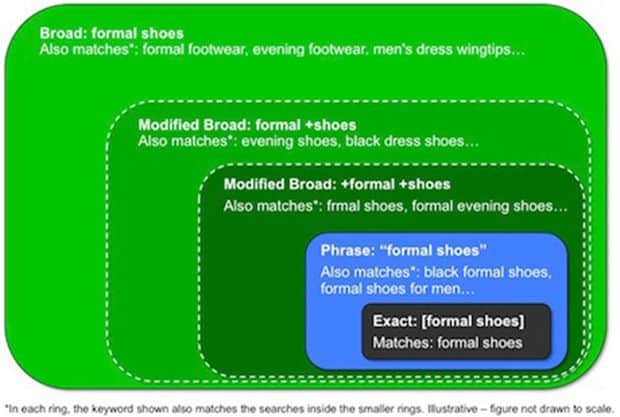
This is the place where you will put your target Keywords. For example, my next post in on Keyword research, and I’m not sure what keyword I should be targeting that post for, I will do some searches based on my knowledge like you see in example, and it shows me results globally and local search.  The idea here is to find a Keyword that has good traffic but low competition. If you are working on a blog for the long-term goal, you can also target high competition Keyword, using resource pages. For ex: WordPress guide. It makes take time before you see your keyword ranking at the good position. Below image illustrates the difference between Broad search, Exact search and phrase search.
Broad Match Traffic
2) Search type:
This is one important column that you should be taking care of. There are three options for search type:
  • Broad
  • Exact
  • Phrase
Exact Match: Exact searches, shows the traffic for exact match Keyword. For example, if you search for WordPress SEO in exact match, it will be different from broad search in great way. My suggestion, prefer Exact search when you are doing research for your micro-niche site and broad search when you are writing on the personal blog. Ex:Keyword Research Broad Match: Broad Match is my favorite, as it let me target long-tail keyword, and your traffic is not limited to exact match words. For Bloggers, broad match is useful but that again depends upon your blog type and target. Ex: “Keyword-based research” Phrase: Phrase type is useful when you need Keyword in an exact phrase. For example: “Best Keyword Research”. Keyword position won’t be changing, but it gives the data for traffic, that your Keyword might be getting for phrase search.
3) Advanced option and filter:
This feature is set to add more filters into your search. For example Country search volume, Language and target device (Computer or mobile devices). Depending upon your target audience, you can set everything including the category.
4) Understand Keyword tool column:
Notice the pointer 4 in the above image and now, understand the meaning of each column.
  • Competition: Just to clear one myth about this tool, competition field doesn’t show how hard and easy it’s to rank for that Keyword. In fact, it shows the competition among advertisers bidding on that keyword. So, if you see “low” for a great keyword, mark it and later we will see how we can easily analyze the competition.
  • Global monthly search : Global monthly search shows the average of search happened in last 12 months globally.
  • Local monthly search : It shows the search volume based on your filter. For example, in above image I have applied filter for U.S as country and notice the huge difference between global and local search volume.
  • Approximate CPC : This column shows approx. CPC (Cost per click), for an advertiser. Many SEO guru’s recommend to use this column to find Adsense CPCKeywords It’s a good idea to pick high CPC keywords, where advertisers are bidding more but with low competition.
For this tutorial, lets keep it simple and lets keep our example for broad search type.

Performing Keyword research using Google Keyword tool:

I hope this must have given you a basic understanding of Keyword tool by Google works and now, we will move to real deal here. Our target is to find some low competitive but high-medium traffic Keyword using Google search, Google Keyword research tool andTraffic Travis. We will be using Traffic Travis to analyze the competition and if you are new to it, read Traffic Travis review. Now, when you start with Keyword research, here is a quick question: What is better? Getting 100 un-targeted visitors or 10 targeted one? If your answer is “Targeted”, then don’t leave those Keyword with low traffic. Since it’s relevant to your niche, in long run it will help you. Make sure to check “Google traffic trend” too, which will help you to check your target keyword traffic pattern over the time.
Discover Keyword using Google Instant search:
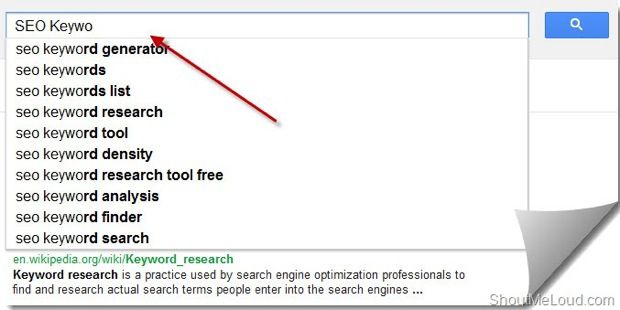
Google instant search is my first basis of finding a perfect Keyword. It’s more like a Keyword discovery tool, which you can use to generate tons of ideas. Though, you can’t actually use all of them, but for initial step it’s good to brain storm some ideas for K/w research. Put any Keyword related to your niche, for example, I started typing “SEO Keywo” and Google instant search suggested search results. Depending upon your post type, you can pick couple of them which make sense to you. Look at this screenshot:Google Instant search Keyword suggestionOnce you have found 3-4 such Keywords, start adding it to Google Keyword suggestion tool and perform a search. So I  picked two keywords from the list: “SEO Keyword Search” & “SEO keyword research” as both are similar and make sense for my niche, and I can come up with a post on that. Now next step is to find if these two Keywords are going to do any benefit in terms of traffic, or just going to be another article with not much value from traffic POV. Lets move on to next step:
Keyword search analysis:
Now, I will put both the Key words in search tool and perform a search, it will give me details for search type I’m performing and also show relevant Keyword ideas. Now, that is keyword goldmine for you, as it will let you find many relevant Keywords that you can target in same post or else can come up with a follow-up posts.
Keyword ideas from Keyword planner tool
I usually target 2-3 Keywords/post. You can create your own SEO strategy depending upon your post quality and length. So, for the information sake, we have selected only Two keywords as shown in above picture and it’s time to check, which one of them is less competitive. Before that, you can change your filter to see if your target Keyword has any exact match type or not.

Checking Keyword competition using Traffic Travis:

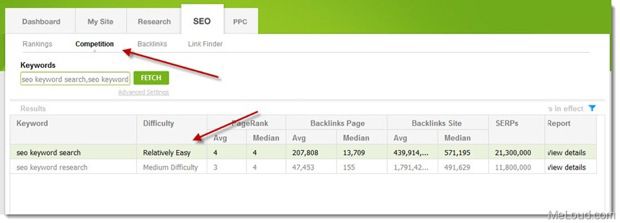
There are many Keyword competition checker tool and some of them which I usually use are SEOmoz Pro and Traffic Travis. T.T being a desktop solution is easier to use. Open Traffic Travis and go to SEO > Competition tab and enter both your Keywords and perform a search. You will see a result like this:
Keyword Difficulty check
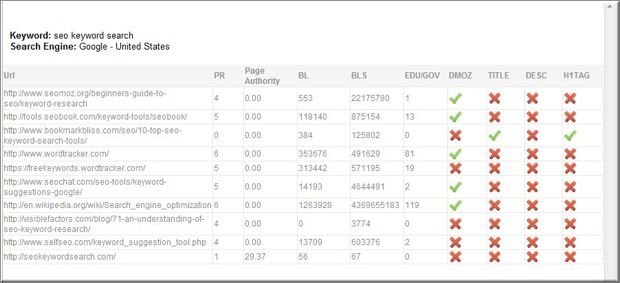
As you can see here, according to competition checker tool, “SEO keyword search” is easier to rank. These tools, consider many factors that includes domain age, backlinks, on Page SEO, page rank, DMOZ submissions and many more factors. You can also click on “view details” to see more detailed results for your competitor. Here is a detailed competition report for my target Keyword : (For first top 10 results)
Keyword Competition detailsAs you can see, from the result on how important it is to have Keywords in your Title, description and H1 tag. Along with above mentioned points, backlink and social media promotion is one major factor for better ranking. Also, my suggestion book your domain for longer time-period, like 2-3 years.
What next?
So now, we have one keyword with us, and similarly you can find many keywords related to your niche. It might be the little time-consuming but it’s worth more than spending un-targeted ten posts. Now, your next target should be writing a Keyword optimize article (SEO copy-writing), and you can refer to our earlier guide on OnPage optimization.
Never forget, this Keyword research is just a primary steps, and real magic starts with your content. Moreover, never try to get traffic on the wrong keyword, as it will affect your overall blog performance in terms of Avg. Time on site and bounce rate. For your old blog articles, if you have not optimized them for any Keyword, you can use Google analytic data, any software for
For your old blog articles, if you have not optimized them for any Keyword, you can use Google analytic data, any software for Keyword research and work on re-optimization for Keyword. I did this for almost 30% of my old posts, and they started ranking in 1-2 page in ranking.
I will come up with a post on the same, but for now you can subscribe to my Email newsletter for next update. I hope this Google Keyword tool guide will help you to find best Keyword for your next article. In case, if you have questions feel free to ask via comments.
12

 
Tricks and Tips